MENUS

Any settings that are made in the System, Sound, MIDI and Pedal menus will take immediate effect, and will be stored until they are changed again.

Note:

The Local Control MIDI setting is an exception and will always revert to “On” when the Nord Electro 7 is powered up.

Enter a menu by holding SHIFT and pressing SYSTEM, SOUND, MIDI or PEDAL (Program buttons 1, 2, 3 and 4). Menus are navigated with the PAGE buttons and settings are changed with the PROGRAM dial. The Up (▲) and Down (▼) soft buttons are used for navigating the vertical list, where applicable. Exit a menu by pressing EXIT (Shift).

SYSTEM MENU

1 - PROGRAM MEMORY (MEMORY PROTECT)

The Protect setting is On when a Nord Electro 7 leaves the factory, preventing accidental overwriting of programs. Setting this to Off enables Store operations. Menu settings and Live programs are not affected by this setting.

Range: On (Default), Off

2 - GLOBAL PITCH

TRANSPOSE: This setting allows for transposing the entire Nord Electro 7 in semitone steps. This setting will be added to any on-panel transpose value stored with a program.
Range: +/- 6 semitones (Default value is “Off”)

FINE TUNE: Fine Tune can be used to fine tune the pitch of the Nord Electro 7 in finer increments.

Range: +/- 50 Cents (+/- half a semitone). Default value is “0”

3 - BRIGHTNESS

DISPLAY: The display brightness can be set to low, mid or high intensity, useful for adapting to different lighting conditions.
Range: Low, Mid (default), High

LEDS: The panel LEDs can be set to either low or high intensity, useful for adapting to different lighting conditions.

Range: Low, High (Default)

4 - AUDIO L/R OUTPUT

The Left and Right outputs of the Nord Electro 7 have a sensing mechanism for determining whether only one or both outputs are connected.

With the Auto output mode and cables connected to both outputs, a stereo signal is provided on the Left and Right outputs togeter. With only one cable connected, both outputs will provide identical mono signals.

In Mono output mode, identical mono signals are always provided on each output, which may be useful for live monitoring scenarios.

Range: Auto (Default), Mono

5 - VERSION AND MODEL INFO

The Version and model info menu page shows the full version number of the currently installed OS (Operating System). This page also displays a QR code which can be scanned with a mobile device, giving online access to this user manual.

SOUND MENU

1 - PROGRAM LEVEL

Adjusts the total output level of the currently loaded Program by adjusting all of its section levels. Note that the Program needs to be stored for the adjustment to stick.

Range: +/- 12 dB

2 - ROTARY MOVEMENT

HORN SPEED: This determines the speed of the Rotary Speaker treble horn.

Range: Low, Medium (default), High

HORN ACCELERATION: This setting determines the acceleration and retardation time of the Rotary Speaker treble horn.

Range: Low, Medium (default), High

ROTOR SPEED: This determines the speed of the Rotary Speaker bass rotor.

Range: Low, Medium (default), High

ROTOR ACCELERATION: This determines the acceleration and retardation time of the Rotary Speaker bass rotor.

Range: Low, Medium (default), High

3 - ROTARY HORN/ROTOR LEVEL

BALANCE: This parameter sets the balance between the treble horn and the bass rotor, defined as a percentage.

Range: 70/30, 65/35, 60/40, 55/45, 50/50 (default), 45/55, 40/60, 35/65 and 30/70

4 - ORGAN KEYBOARD TRIGGER POINT

This setting determines how the Nord Electro 7 keyboard triggers Organ sounds. When “High” is selected, it will be triggered before the key is fully depressed, which is more similar to how a real B3 works.


Range: High, Low (Default)
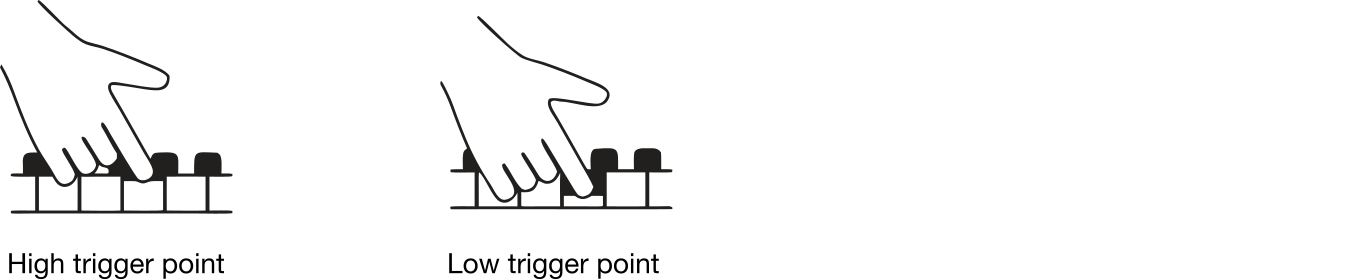
trigger point s

5 - ORGAN B3 SETTINGS

TONE-WHEEL: Sets the level of tonewheel crosstalk and cable leakage artifacts of the B3 organ model.

Range: Clean, Vintage 1 (default), Vintage 2

KEY CLICK: This sets the level of the Key Click for the B3 organ model.

Range: Low, Normal (default), High

KEY BOUNCE: This controls the Keyboard Bounce feature for the B3 Organ Model. When turned On, the key off click is accentuated on quick key releases.

Range: Off, On (default)

6 - ORGAN B3 PERCUSSION

NORMAL VOLUME: Sets the level of the B3 Percussion effect in its Normal setting.

Range: Low, Medium (default), High

SOFT VOLUME: Sets the level of the B3 Percussion effect in its Soft setting.

Range: Low, Medium (default), High

SLOW DECAY: Sets the Slow mode decay time of the B3 Percussion effect.

Range: Long, Medium (default), Short

FAST DECAY: Sets the Fast mode decay time of the B3 Percussion effect.

Range: Long, Medium (default), Short

7 - PIANO STRING RESONANCE LEVEL

Sets the level of the Piano String Resonance feature, which is available for Acoustic pianos in sizes Med, Lrg and XL.

Range: +/- 6 dB (0 dB Default)

8 - PIANO PEDAL NOISE

ENABLE: This setting turns the Piano Pedal Noise feature On or Off on a global basis. If turned On, and a Nord SP-2 or TP-1 is used, the Pedal Noise will be present in all instances when an acoustic or electric Piano sound is used.

Range: On, Off (default)

LEVEL: This setting determines the level of Pedal Noise present when pressing down on the sustain pedal and an Acoustic or Electric Piano sound is used.

Range: +/- 6 dB (0 dB default)

ⓘ For access to the Piano Pedal Noise feature, either the Nord Single Pedal 2 (Nord SP-2) or Nord Triple Pedal 1 (Nord TP-1) needs to be used and selected in the Sustain Pedal Type menu.

9 - PIANO AND SAMPLE INFO

PIANO: Shows the name, size, version number and size in megabytes of the selected Piano sound, along with any additional information.

SAMPLE: Shows the name, version number and size in megabytes of a selected Sample sound, along with any additional information.

MIDI MENU

1 - MIDI CHANNELS

LOCAL CONTROL: MIDI Local Control determines if the Nord Electro 7 keyboard and panel will control internal sound engines and programs or only transmit MIDI. Local Control On is the normal “play mode”. When Local Control is in Off mode, front panel and keyboard actions are transmitted via MIDI only.

Range: On (Default), Off

ⓘ Local Control always defaults back to “On” every time the Nord Electro 7 is powered on


GLOBAL CHANNEL: This sets the transmitting and receiving MIDI channel for the Nord Electro 7. This MIDI channel transmits all keyboard, pedal and panel actions as MIDI signals. It can also be used as a receiving channel with full control of the entire Nord Electro 7.

Range: 1-16, Off (Default 1)

AUX KB CHANNEL: This sets the receiving MIDI channel for the Nord Electro 7 Aux KB feature, which allows for controlling individual sections from an external MIDI keyboard. Read more about how to set up and use Aux KB on page 31.

Range: 1-16, Off (Default 1)

2 - MIDI SEND/RECEIVE MODE

PROGRAM CHANGE: This setting determines whether your Nord Electro 7 transmits and/or receives MIDI program Change Messages, on the MIDI channel.

Range: Off, Send, Receive, Send & Receive (Default)

CONTROL CHANGE: This allows you to set if you want your Nord Electro 7 to transmit and/or receive MIDI Controller Messages or not on the MIDI channel.

Range: Off, Send, Receive, Send & Receive (Default)

ⓘ Use the Type setting below to determine whether both single value CC messages, used for most panel controls, and NRPN messages used for certain panel functions should be sent or received. Read more about NRPN messages on page 47

3 - MIDI SETTINGS

TRANSPOSE AT: When set to In, active transpose values (global and/or set per program) are not applied to outgoing MIDI, but only to incoming MIDI data. In Out mode sent MIDI notes are transposed but not incoming ones.

Range: In (Default), Out

OUTPUT VELOCITY: There are three options for how the velocity of outgoing MIDI notes is scaled. When set to Heavy, the generated MIDI corresponds to the dynamic range of the Nord Electro 7 Piano engine, and this setting should be used when playing the Nord Electro 7 in Local Control “Off” mode from the local keyboard. The Medium and Light curves require increasingly less effort to generate higher velocity values

Range: Standard (Heavy, Default), Medium, Light

PEDAL MENU

1 - EXPRESSION PEDAL

TYPE: The Nord Electro 7 accepts many of the most commonly available control pedals through its EXPRESSION PEDAL input. Choose a setting here that matches the pedal being used.

Range: Nord EP (Nord EP15 or Nord EP30, Default), Nord SP-2, Roland EV7, Yamaha FC-7, Korg, Fatar/Studiologic

ⓘ If a connected pedal is operated while in this menu, a percentage indicating the range of the connected pedal is displayed.


GAIN: This setting allows for adding some gain to the pedal signal. This can be useful if an attached pedal does not reach its maximum level or setting.

Range: 1 - 10

2 - SUSTAIN PEDAL

TYPE: This allows you to select the type of pedal connected to the SUSTAIN PEDAL jack, in case the functionality of the pedal is reversed (when the pedal is up, sustain is on and vice versa).

Range: Nord SP-1 (Default), Nord SP-2, Nord TP-1, Normally Open, Normally Closed

SINGLE/RIGHT: This setting determines the functionality of a connected single sustain pedal, or the rightmost pedal if the Nord TP-1 pedal is used.

Range: Sustain (Default), Sustain+Rotor Toggle, Sustain+Rotor hold

MIDDLE: Apart from the default Una Corda setting, this pedal can be used for a range of other useful functions.

Range: Una Corda (Default), Rotor Toggle, Rotor Hold, Synth Vibrato, Program Up, Program Down

ⓘ This option is only present if Sustain Pedal Type has been set to Nord TP-1.


LEFT: Apart from the default Sostenuto setting, this pedal can be used for a range of other useful functions.

Range: Sostenuto (Default), Rotor Toggle, Rotor Hold, Synth Vibrato, Program Up, Program Down

ⓘ This option is only present if Sustain Pedal Type has been set to Nord TP-1.

3 - ROTARY CTRL/FOOT SWITCH

TYPE: The ROTARY CTRL/FOOT SWITCH jack on the Nord Electro 7 accepts a variety of different pedals, with either one or two buttons/switches. The optional Half Moon Switch is also connected to this jack. Set the Type parameter according to the connected model.

If you are unsure of the polarity of the pedal, simply check whether the chosen functionality works as expected, if not select the other polarity (Open or Closed).

Range: Single Open (Default), Single Closed, Dual Open, Dual Closed, Half Moon

ⓘ The Nord SP-2 pedal, and other continuous type pedals, are not compatible with the Foot Switch jack.

SWITCH A: The Switch A parameter determines the function of an attached single pedal, or the first switch of a dual pedal.

Range: Rotor Toggle (Default), Rotor Hold, Synth Vibrato, Program Up, Program Down

SWITCH B: The Switch B parameter determines the function of the second switch of a dual pedal and has no effect when a single pedal is connected.

Range: Rotor Toggle (Default), Rotor Hold, Synth Vibrato, Program Up, Program Down